
New Feature: Ability to Move Own Video Preview
This one is straight from our short-but-sweet-news dept. Today’s update to the Gruveo web client brings the ability to drag own picture across the screen. Dragging works in all supported browsers on desktop and Android as well as in the embedded version of Gruveo.
One extra nicety is that your “PIP” position is remembered for future calls so you don’t have to readjust it every time.
“Hello, can you hear me”: Better Handling of Sound Issues in Gruveo
Gruveo is built on the rapidly evolving WebRTC technology for establishing video calls, and it seems that sound issues are quite common in the current browser implementations of WebRTC. One manifestation of this is one (or both) users being unable to hear the other.
We have been working on addressing the sound problems for quite some time, and we are happy to announce the first fruits of our labor. Today, we are rolling out a new version of the Gruveo web client that is now actively monitoring your microphone and alerts you if there is no sound coming in:
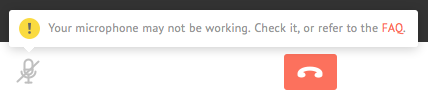
Gruveo now alerts you whenever there is no sound coming from your mic.
It doesn’t end there. We have updated our FAQ with a detailed guide to troubleshooting sound issues in various scenarios to help you squash any problems quickly and efficiently.
We are excited about these new developments and would love to hear your feedback. Leave a comment below and let us know what you think!
Now Available in Hungarian
Did you know that the Hungarian language is one of the few languages in Europe that's not an Indo-European one? It has only two related languages in Europe: Finnish and Estonian.
We know because we translated Gruveo into Hungarian so the web version is now available in 9 different languages. Enjoy!
P.S. Want to see Gruveo in your language? Drop us a line.
Gruveo Embeds Now Open to Everyone
 Last December, we launched our closed beta program for Gruveo embeds. Over these past months, we have seen tremendous interest from users wishing to add Gruveo to their site, and we witnessed quite a few integration success stories.
The time has come, and we are excited to announce that Gruveo embeds are now open to everyone. Click the button below to request your free embed code:
[button_6 bg="orange" text="style5_getstartednow.png" align="center" href="https://about.gruveo.com/get-embed/"/]Here are just a few reasons to add Gruveo to your web property:
- Arrange video meetings with clients right on your website
- Enable your users to communicate with each other securely
- Take existing service to the next level by adding video calling capabilities to it
- …And it’s all FREE!
Go ahead and embed Gruveo today – click here to request the code.
Increased Server Presence in Europe and South America
Fresh on the heels of refactoring our infrastructure for better scaling, we are increasing our server presence in South America and Europe. So if you are making Gruveo calls to/from one of those regions, you may notice lower delays and overall smoother call experience, starting today. Enjoy!