
Announcing User Availability Status
Permanent Gruveo links are an amazing tool that lets your customers video call you without installing apps or signing up.
However, what if you don't want to receive any Gruveo calls outside of your business hours? Previously, the only way to make yourself unavailable on Gruveo was to log out on all your devices and then log back in the next morning.
The new user availability feature in Gruveo addresses this problem head-on. With this feature, Gruveo users can now set their availability to "online," "away," and "offline," indicating how they want to be notified of incoming calls.
Here's a quick summary of what these options mean:
- Online - You receive a notification for each incoming call as usual.
- Away - You don't receive incoming call notifications, but your callers are still placed in a call queue for when you return.
- Offline - No call notifications; same as when you are logged out of Gruveo.
To set your availability status, just head to your Gruveo dashboard, click your name in the upper right corner and choose the status in the drop-down menu.
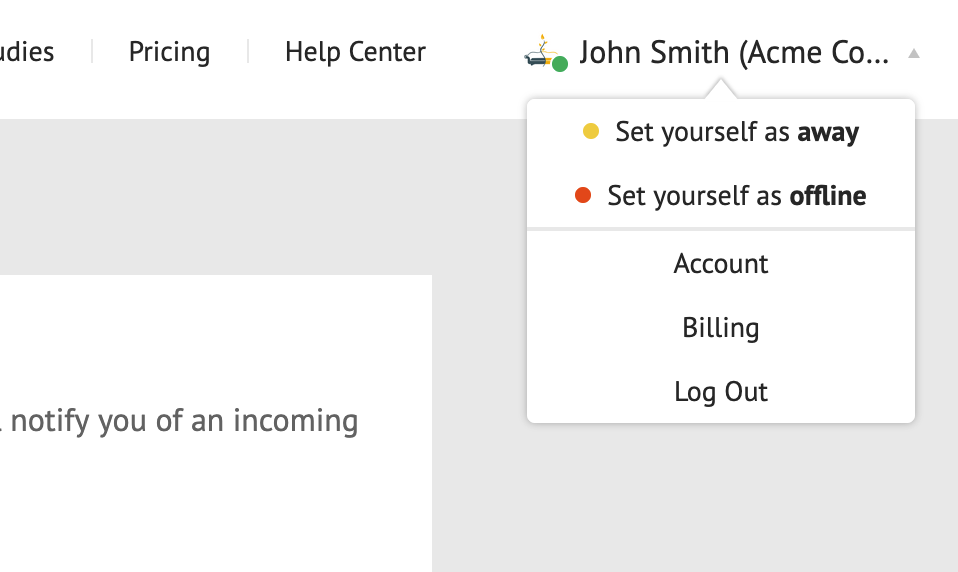
Setting your availability status is only supported in the Gruveo web app for now, but the status you set applies to all Gruveo apps where you are logged in – including Gruveo for iOS and Android. You can read more about setting your availability status in our Help Center.
Enjoy this new feature, and don't hesitate to reach out if you need help!