
Category Archives for Announcements
The New Selfie Mode Puts You in Control of Your Looks
The latest update to the Gruveo iOS app introduces Selfie Mode, which lets you ensure that you look your best on the other end of the video conversation.
Using the Selfie Mode is simple: Tap own video in the upper right corner and enjoy the picture of yourself spanning full-screen, just like the other person would see you. To go back, tap the picture in the upper right again.
You don’t have to be connected to use Selfie Mode, so toggle it to check your hair while you’re waiting for the other person 🙂
The inspiration for Selfie Mode comes from an actual user need. We were contacted by a real estate company that uses Gruveo for virtual apartment tours. Gruveo’s ease of use made it the perfect tool for the job, if not for one thing: It was very hard to ensure the best shot looking at the tiny own video preview window.
As we pondered this use case, we realized that apartment tours are not the only situation that would benefit from better control of the outgoing video, and that’s how Selfie Mode was born. So whether you want to check your makeup, show your kids play to their grandparents, or conduct a virtual apartment tour, Selfie Mode is there for you.
Selfie Mode is currently only available in the iOS app but there are plans to port it to the web version of Gruveo as well.
Announcing Gruveo Instant Connect for Chrome
Imagine that you’re chatting with a friend in your browser and then decide to invite her to a quick Gruveo call. You could open Gruveo in a new tab, click the call button to start a call on a random code, and then send over the link to your friend. But what if you could generate a random call link in just one click, without leaving the page? Or, better yet, what if you could insert a link right into the chat box with one simple keystroke?

Just click the Gruveo button to get a random call link.
You can do all of these and more with Gruveo Instant Connect, our new extension for the Chrome browser that hit the Chrome Web Store today. Gruveo Instant Connect makes generating a random Gruveo link almost painfully easy: Just click a button on the browser toolbar to get a call link that you can open, copy or add to calendar. Or, right-click any text box on a page and choose “Insert Gruveo link”. No hassle at all!
Download our shiny new extension today:
[button_1 text="Get%20Gruveo%20Instant%20Connect" text_size="20" text_color="#ffffff" text_bold="N" text_letter_spacing="0" subtext_panel="N" text_shadow_panel="Y" text_shadow_vertical="1" text_shadow_horizontal="0" text_shadow_color="#000000" text_shadow_blur="0" styling_width="25" styling_height="15" styling_border_color="#dd7103" styling_border_size="1" styling_border_radius="15" styling_border_opacity="100" styling_shine="Y" styling_gradient_start_color="#ffbe6b" styling_gradient_end_color="#dd7103" drop_shadow_panel="Y" drop_shadow_vertical="1" drop_shadow_horizontal="0" drop_shadow_blur="1" drop_shadow_spread="0" drop_shadow_color="#000000" drop_shadow_opacity="50" inset_shadow_panel="Y" inset_shadow_vertical="0" inset_shadow_horizontal="0" inset_shadow_blur="0" inset_shadow_spread="1" inset_shadow_color="#fece94" inset_shadow_opacity="50" align="center" href="https://chrome.google.com/webstore/detail/gruveo-instant-connect/jlongfhigcebblbebgmpobcgjhlhegcc"/] P.S. If you like the extension, please rate it 5 stars and give it a +1. That will make us all very happy 🙂New Feature: Ability to Move Own Video Preview
This one is straight from our short-but-sweet-news dept. Today’s update to the Gruveo web client brings the ability to drag own picture across the screen. Dragging works in all supported browsers on desktop and Android as well as in the embedded version of Gruveo.
One extra nicety is that your “PIP” position is remembered for future calls so you don’t have to readjust it every time.
“Hello, can you hear me”: Better Handling of Sound Issues in Gruveo
Gruveo is built on the rapidly evolving WebRTC technology for establishing video calls, and it seems that sound issues are quite common in the current browser implementations of WebRTC. One manifestation of this is one (or both) users being unable to hear the other.
We have been working on addressing the sound problems for quite some time, and we are happy to announce the first fruits of our labor. Today, we are rolling out a new version of the Gruveo web client that is now actively monitoring your microphone and alerts you if there is no sound coming in:
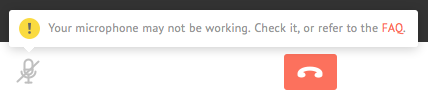
Gruveo now alerts you whenever there is no sound coming from your mic.
It doesn’t end there. We have updated our FAQ with a detailed guide to troubleshooting sound issues in various scenarios to help you squash any problems quickly and efficiently.
We are excited about these new developments and would love to hear your feedback. Leave a comment below and let us know what you think!
Now Available in Hungarian
Did you know that the Hungarian language is one of the few languages in Europe that's not an Indo-European one? It has only two related languages in Europe: Finnish and Estonian.
We know because we translated Gruveo into Hungarian so the web version is now available in 9 different languages. Enjoy!
P.S. Want to see Gruveo in your language? Drop us a line.