
Category Archives for Announcements
Gruveo App for Android Coming Next Week!

You may have heard that something very exciting is coming...the Gruveo Android app! We can finally reveal that the launch date is Tuesday 7th June...just one short week away.
Our Android users can already make Gruveo calls via their browser. This option will still be available but soon you will have the added convenience of a native app too!
Want to be alerted to the Android app launch? Sign up for our newsletter here to receive all the Gruveo breaking news:
iOS App Update Has Landed!
It’s finally here! The updated version of the Gruveo app is now officially live!
Probably our most useful new feature is push notifications which alert you when the other party joins the call (allowing you to check social media or the football results while you wait...)
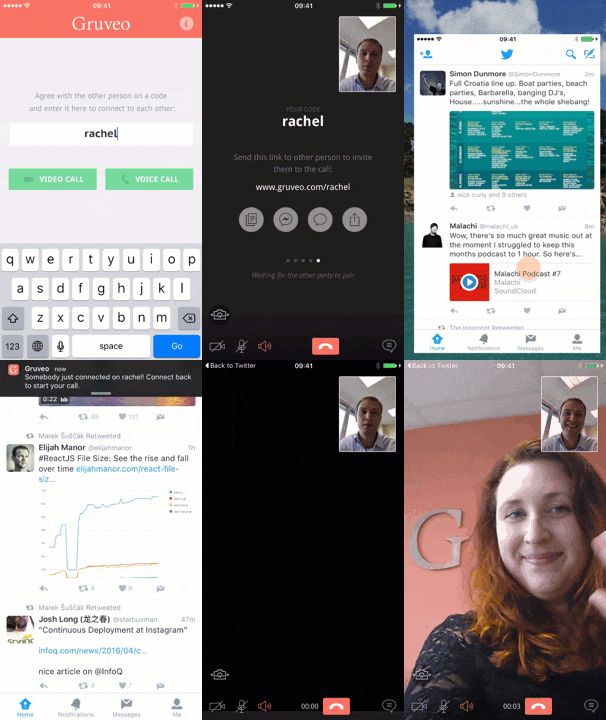
So when you update the app which other new features can you look forward to?
- Automatic emoticon replacement in text chat
- Swipe to show and hide the chat box
- New call timer
- Chat in the sidebar on iPad in landscape mode
- New semi-transparent control bar
- New visible system status bar (allows you to still see the time and battery level)
- Screen optimizations for iPhone 6 and 6 Plus
- Ability to drag your own picture
- Send or share the Gruveo call link right from your call waiting screen
Enjoy the new functions and let us know here if you have any ideas or suggestions for our next update.
Don’t have the iOS app? Download it here:


Gruveo API Developer Update

Languages
We have added 6 more languages: Chinese (Simplified), Czech, Dutch, Finnish, Japanese and Korean. These have been added to the language embed parameter which sets the language of the Gruveo embed on your page. More languages will be on the way, feel free to suggest one!
New API Events
Although the API has been doing a great job telling the host page what has been happening with the embed, sometimes it was hard to link those events to actual user actions. We have now fixed this by providing the following events that the API can fire: callInit, busy, hangup.
Restricting to a Certain Code
We have altered the code embed parameter (which pre-populated the code in the embed) to now make the code field read-only. This is ideal if you want your Gruveo embed to be restricted to a certain code.
Mute/Unmute
The toggleVideo() and toggleAudio() API methods now let you programmatically mute/unmute the user's camera and/or microphone in the Gruveo embed. The new streamStateChange API event also tells your page whenever the camera and/or microphone are muted or unmuted in the embed.
For more details check out the changelogs here and here.
Keep an eye out for more updates coming soon!
Gruveo Links are Getting Easier to Remember...

Good News!
There is now no need to remember the # if you are manually typing the link to your Gruveo call (unless you really want to add it, in which case it will still work).
Here's to making things even easier!